Irame is a governance and compliance platform for internal audit teams. The hard part of its access control was never the permission list: an audit department has to prove who could do what, on any given day, to somebody who does not trust them.
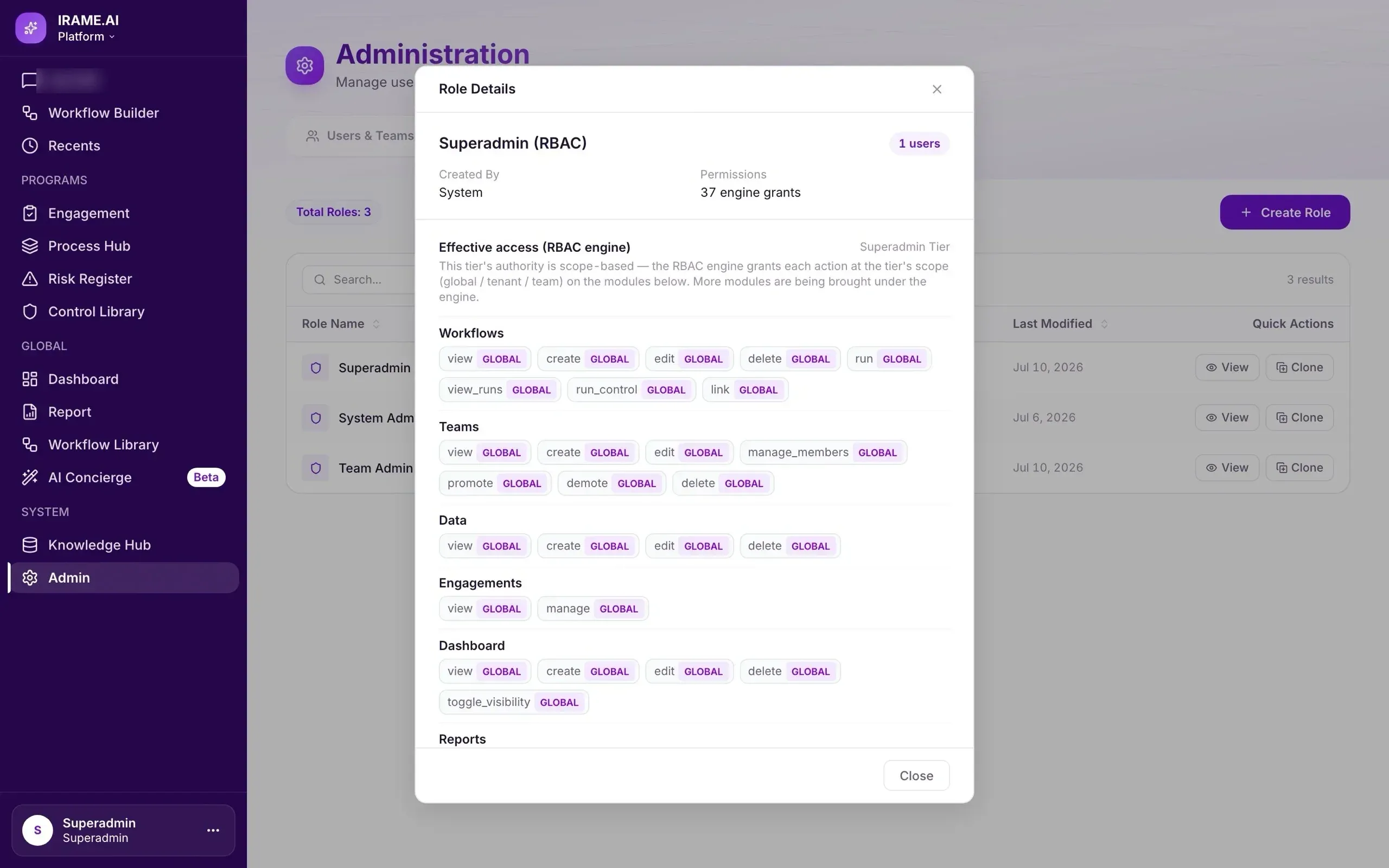
The platform tier. Every power appears with its reach, so an administrator reads the tier instead of trusting its name.
Role
Senior Product Designer
Company
Irame.ai
Scope
Access control module, end to end
Timeline
Sep 2025 – Feb 2026
75 → 3permissions collapsed into ordered tiers
5production flows, designed and shipped in code
Problem
Nobody could say what a role permitted, or prove later who could do what. Access was 75 unordered permissions across 11 resources, and invitations expired silently.
My role
Senior Product Designer and module owner: the access model, every screen, the interface copy, and the production front-end code.
What I did
Replaced the permission list with three ordered tiers that differ only in reach, across five production flows, with an audit trail built to be read as evidence.
Outcome
Live in production. Role setup fell from 20 minutes to under 2, and it is the answer the team gives when a customer asks how access works.
Before and after
From 75 unordered permissions to 3 tiers anyone can compare
What the old model was
75 permissions across 11 resources, any combination assignable into a role
Authority scattered across three places at once: org role, team membership, a per-team flag
Role names (Admin, Auditor, Viewer) assigned and displayed, but never defined
Invitations that expire silently, telling nobody
What I built instead
3 ordered tiers (platform, organisation, team) that can be compared in one sentence
Every screen in the module, shipped as production code, not handed over as a spec
A tier panel that states authority in plain words before listing anything
An audit trail built to be read as evidence, not just a log
Decisions
Three decisions that shaped the module
Ordered tiers instead of permission listsInstead ofPer-role lists: 75 checkboxes and no way to compare two roles.WhyEvery tier has the same powers and differs only in how far they reach, so you can compare any two roles in one sentence to a client.
A head-count on every roleInstead ofSaving an edit without knowing who it reaches.WhyEach role shows how many people hold it, so an administrator knows who an edit will reach before saving.
Expired invitations stay visibleInstead ofHiding them, which would tidy the list.WhyIt would also erase the fact that two people never got in.
Walkthrough video
The whole story in under 6 minutes
Full story
That's the short version. Below: the problem, my role, the idea, five flows on real screens, what's underneath, and the outcome. Each section opens with its point; the detail sits in toggles.
The problem
An audit platform could not describe its own separation of duties
49 / 75
Old permissions the new engine actually reads
2 / 3
Pending invitations expired here, silently
No role definition
Admin, Auditor, Viewer were assigned and displayed, never defined anywhere in the product.
Authority in three places
An organisation role, team membership, and a per-team admin flag, each one a place authority could hide.
Silent invitations
Invitations expired without telling anybody, not the invitee, not the administrator.
A permission list is unordered. Two roles built from the same catalogue cannot be compared, because forty permissions and forty permissions might overlap on ten. There is no more than, no less than, no contains.
The whole brief: an administrator should be able to look at any person and say what they can reach, hand somebody authority while understanding exactly what they just handed over, and show a reviewer months later how that person came to have it.
The full problem: what the product must do, what was wrong and why, why it mattered, what made it hard5 parts · about 2 min
What the product has to be able to do
Internal audit only works if the check is independent: the person who does a test can’t be the person who approves it.
Every audit department has to prove that rule held, on any given date, to a regulator, a client, or an outside auditor who has no reason to take their word for it.
So an access control screen here isn’t administrative furniture. It’s the evidence a customer points to.
If it can’t answer that, the department falls back to a spreadsheet, the exact thing they bought software to stop doing.
What was wrong
Nobody could say what a role permitted. Admin, Auditor, Viewer were assigned and displayed, never defined anywhere in the product.
A person’s authority lived in three places at once: an organisation role, team membership, and a per-team admin flag.
People were invited and quietly lost. Invitations expired silently, and told nobody: not the invitee, not the administrator.
Why it was wrong
Root cause: permissions with no model. A catalogue of 75, across 11 resources, any combination assignable into a role.
A permission list can’t be ranked. Two roles with 40 permissions each can overlap on just 10, so “does this person have more authority than that person” has no answer a screen can give.
Role names undefined, authority scattered, teams named by whoever created them: all downstream of one missing idea.
Why it mattered enough to fix
Cost the customer twice: administrators either over-granted and hoped, or under-granted and ate the interruptions. And a review meant rebuilding access by hand, from memory.
Cost the business directly: access is the first question in every customer security review.
Timing came from elsewhere: a new permission engine was being built underneath, opening a window to redesign the model instead of patching it.
What made it hard
I didn’t own enforcement. The engine decided what could apply; the interface could describe authority, never grant it.
Customers already had roles on real people. There was no clean slate: the new model had to migrate in alongside the old one, one workspace at a time.
The audience isn’t technical. Any model that needs “role-based access control” explained to it has already failed.
The module is used rarely, maybe twice a quarter per administrator. Nothing here can lean on familiarity.
Role
What I owned
Mine
The access model as a product concept, including the split between organisation-wide authority and team-level authority.
Every screen in the module: users, teams, invitations, role detail, role creation, the audit trail.
The interface copy, which in this module does most of the work of making the model legible.
Production front-end code. I shipped these screens rather than handing over a spec.
Not mine
The permission engine underneath. I designed against what it could enforce; I did not define it.
Server-side enforcement. These screens describe authority; they do not grant it.
Invitation delivery, sign-in, and session handling.
What I was aiming at, for the person using it and for the businessGoals
For the person using it
Answer “what can this person do” without asking an engineer.
Change someone’s access in one place and see it recorded.
Never confuse authority over one team with authority over the whole organisation.
For the business
Survive a customer security review, where access is always the first question.
Make the audit trail good enough to be treated as evidence, since the customers are auditors.
Keep access questions away from support and engineering.
Who this is for: working personas from the roles the product implements3 personas
Working personas rather than researched ones. They came from the roles the product implements and from internal conversation with people who work alongside auditors.
The administrator
Usually one person per customer
Often the head of internal audit, or somebody in IT acting for them.
Sets the platform up once, then returns only when somebody joins or leaves.
Nobody notices their work until a colleague cannot open a file they were told to review.
The team lead
Runs one audit
Needs to bring people into their own team and hand out work without being able to reach into anyone else’s.
This is the persona the whole model exists to serve.
The auditor
Does not think about access
And should not have to.
Encounters the module exactly twice: the day the invitation arrives, and the day something they expected to open will not open.
The idea
One set of powers, three levels of reach
The move that unlocked everything after it.
The obvious approach: give each role its own permission list. That produced the mess I was handed, 75 permissions across 11 resources, each a checkbox like team:delete_member. Anyone could build a role. Nobody could compare two.
A permission list is unordered. Two roles with 40 permissions each can overlap on 10, nothing you can put in a sentence to a client.
So I stopped treating administrative roles as lists. Every administrative tier holds the same powers: they differ only in how far those powers reach.
Tier
Authority
Over
What it gives up
Platform admin
the full set
every organisation
nothing
Organisation admin
the same full set
one organisation
anything outside its own organisation
Team admin
the same, minus three
one team
creating a team, deleting a team, demoting a member
The top two tiers are identical in what they can do and differ only in where they stop, the whole argument in one row.
Platform adminEvery organisation
Organisation adminOne organisation
Team adminOne team
Flow one · Getting somebody in
From nothing to a person who can sign in
The first impression of the whole platform, and the flow that fails most quietly.
Five flows, in the order an administrator meets them. Each is one click away; where flow one breaks is open below.
Walk through flow one: five steps, on the real screens5 steps · about 1 min
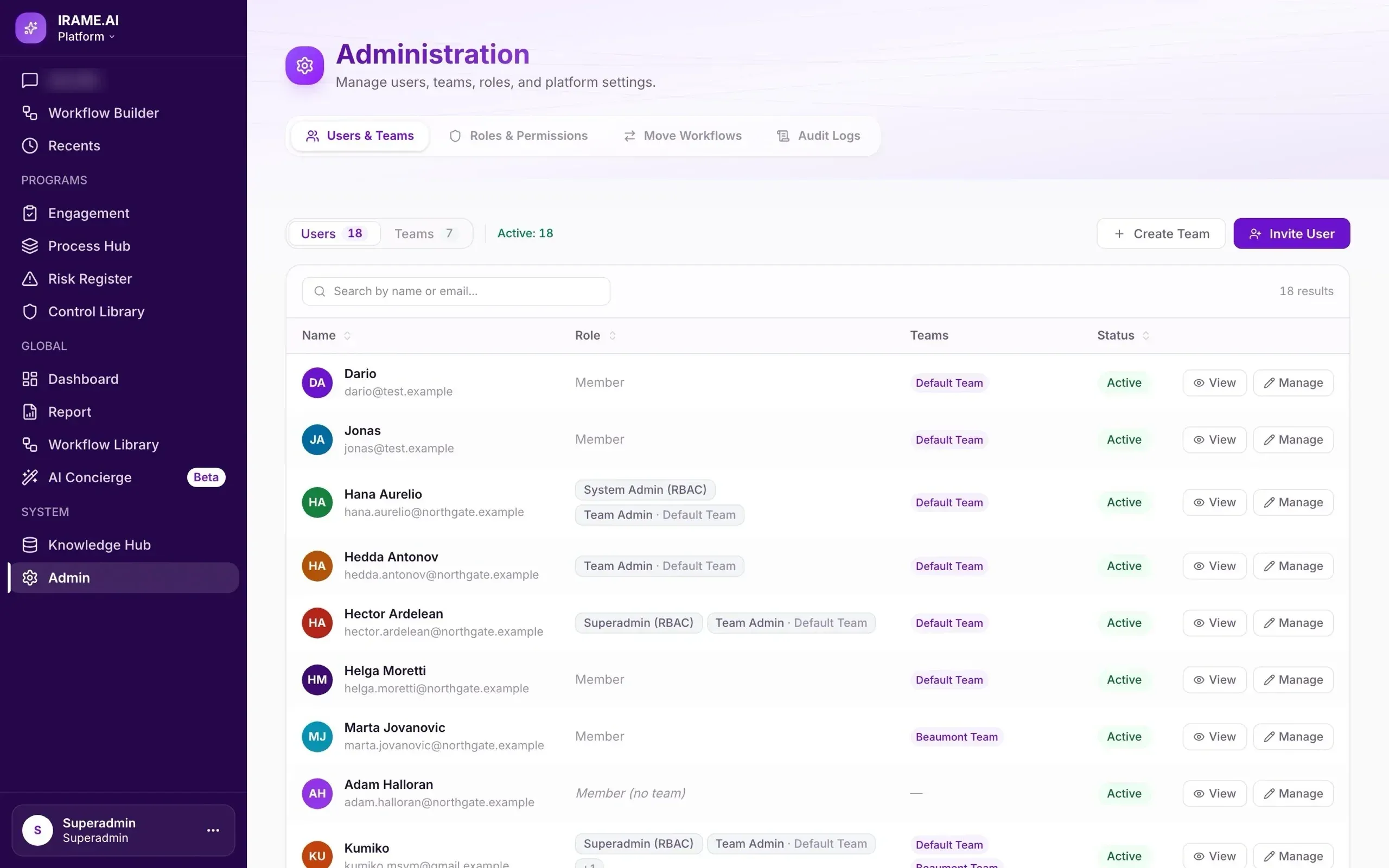
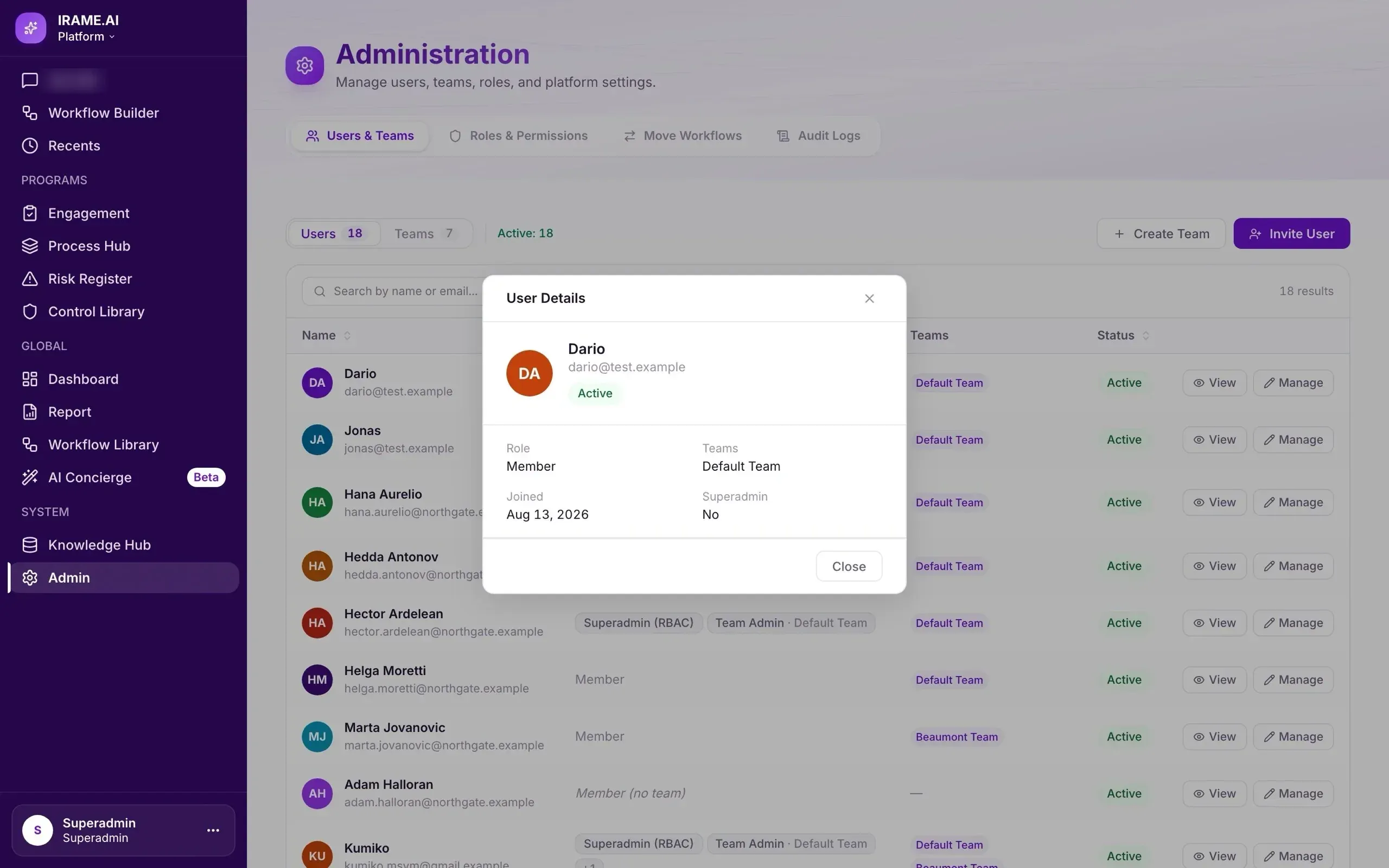
Step 01 of 5 · Admin, Users and Teams
Open the people list.
Everyone in the organisation with their role, teams and status.
FromAdmin
Users and Teams
Role
Teams
Status
Role · Teams · StatusUsers & Teams, 18 people
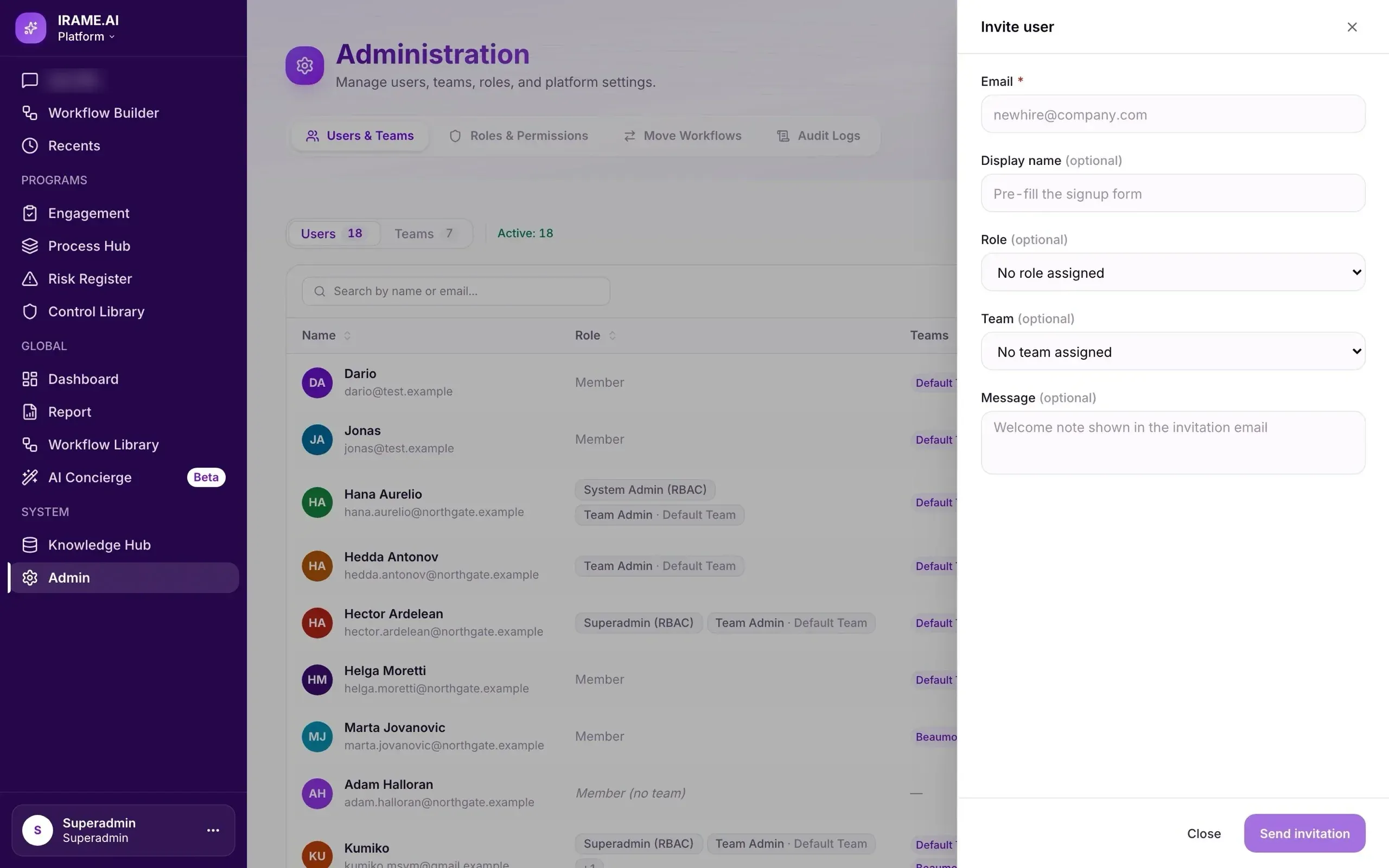
Step 02 of 5 · Invite User, right-hand drawer
Invite.
A drawer asks for an email address. Display name, role, team and a message are all optional.
FromPeople list
Invite User
Email addressrequired
Name, role, teamand a message, all optional
Only email is requiredInvite user drawer
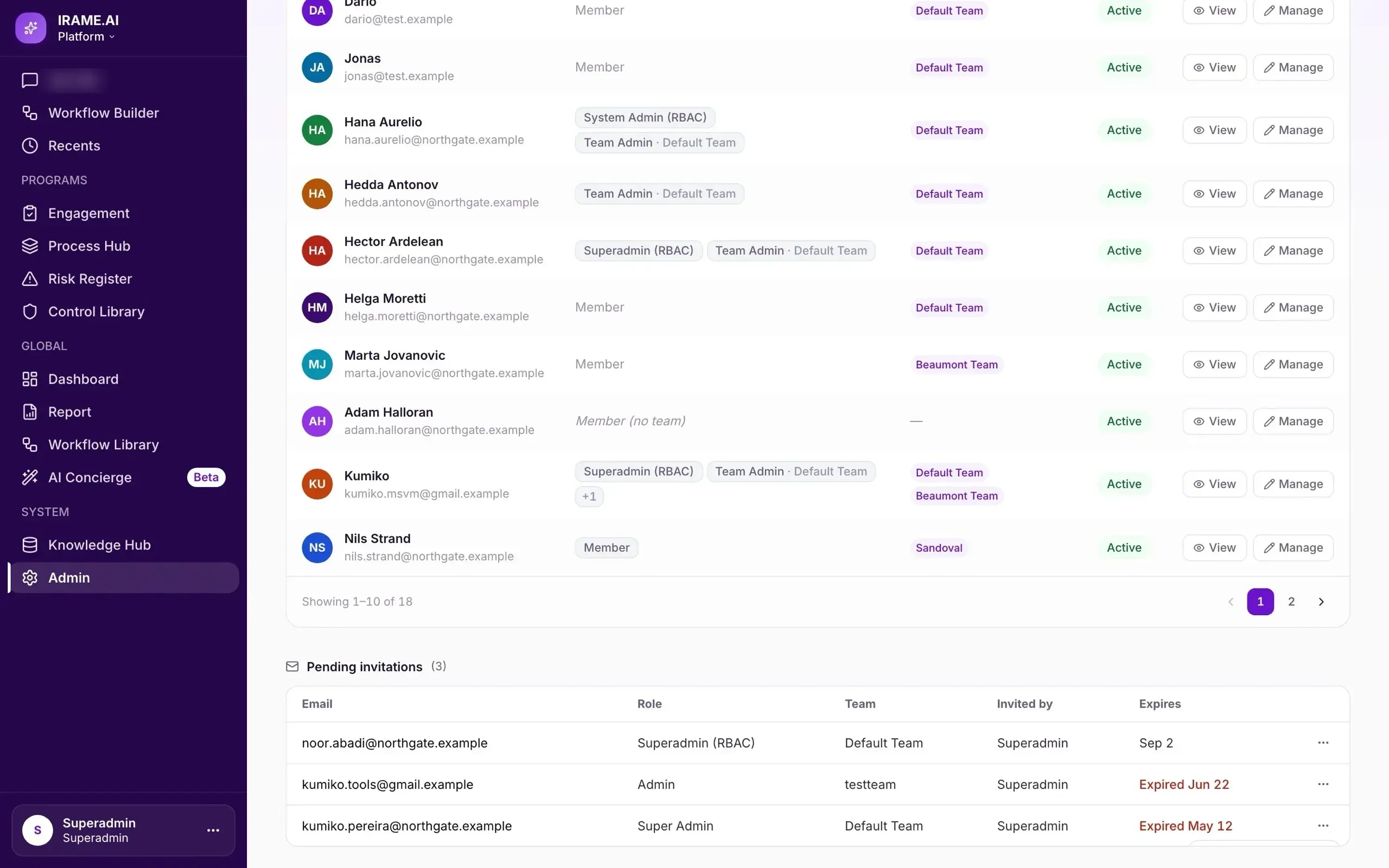
Step 03 of 5 · same screen, below the fold
The invitation appears as pending,
in its own table under the people list, carrying an expiry date. Two of the three here are past it.
FromInvite sent
Pending
1 still openexpires Sep 2
!2 expiredJun 22, May 12
2 of 3 already expiredPending invitations table
Step 04 of 5 · no screen
Nothing happens.
No reminder before the invitation lapses, and no prompt after.
FromPending invitation
Expires
!No reminderbefore it lapses
!No promptafter it lapses
Step 05 of 5 · unlabelled icon at the end of the row
Resend or revoke,
if the administrator thinks to look, from a menu on the row.
FromExpired invite
Unlabelled ⋯ menu
Resend
Revoke
No text, just an iconUnlabelled row menu
Where it breaks, and the fix
Step four is a gap, not a step. A lapsed invitation tells nobody: the invited person assumes the platform is slow, the administrator assumes the job is done.
Two of the three pending invitations in this organisation expired months ago.
Making role and team optional at invite was the right call. Having no follow-up wasn’t. A person invited with no team, whose invitation then expires, is invisible twice over.
Fix: a reminder before an invitation lapses, and a prompt on the admin screen after it does.
Four more flows: giving authority, standing up a team, answering the question, proving it afterwardsreal screens, step by step · about 7 min
Flow two · Giving somebody authority
Deciding what a person is allowed to do
The flow the whole model exists to serve, and the one with the sharpest gap in it.
Step 01 of 6 · Admin, Users and Teams
Find the person
in the people list, by search or by paging through.
FromUsers and Teams
People list
Searchby name or email
Page through
Search by name or emailSearch by name or email
Step 02 of 6 · View
Check before changing.
View opens a read-only summary, so looking somebody up cannot alter them.
FromPeople list
Person
Viewread-only, can't alter
Managechanges access
Read-only, no edit controlsView, read-only
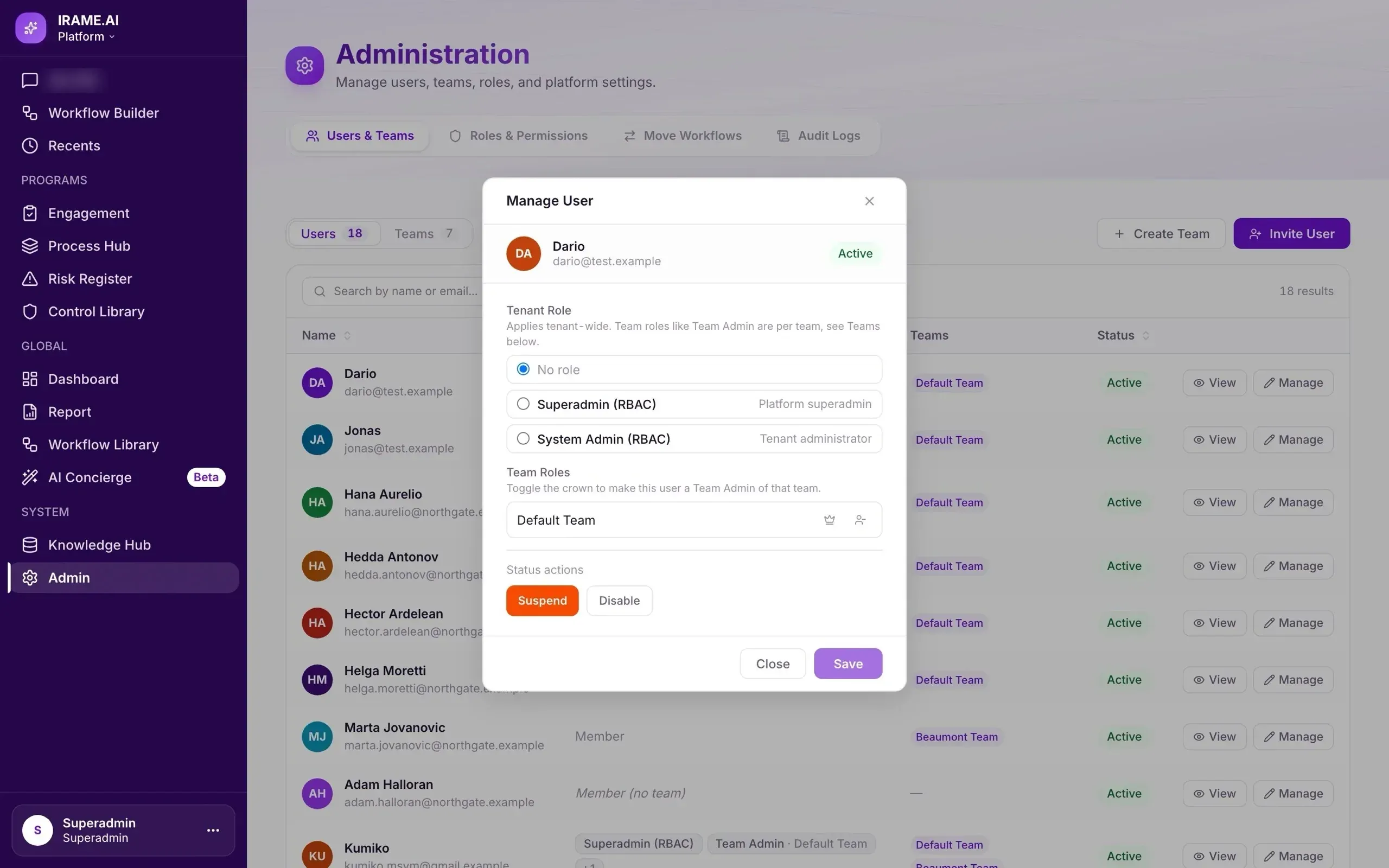
Step 03 of 6 · Manage
Open Manage.
Organisation role is a single choice. Team roles are separate, one toggle per team.
FromPerson
Manage
Organisation roleone choice
Team rolesone toggle per team
Tenant role, single choiceManage panel opens
Step 04 of 6 · Manage
Choose a role by its name
and a line of description, which says who a role is for and not what it permits.
FromManage
Role options
Role name
Who it's forone line
!What it permitsnot shown
Says who, not what it permitsChoose a role by name
Step 05 of 6 · a different tab
Leave the flow to find out.
Roles and Permissions, find the role, open it, read the tier, come back.
FromManage›Roles and Permissions
Role
Read the tier
!Back to Manageform filled in again
The answer is on another tabRoles and Permissions, another tab
Step 06 of 6 · Manage
Save.
No summary of what changed, and no confirmation of what the person can now reach.
FromManage
Save
!No change summary
!No reach confirmation
Save, nothing above itSave, no summary
Where it breaks, and the fix
Steps four and five are where it fails. Each role gets one line of description, a category, not an answer.
So in practice nobody does that. They pick by name, exactly the guessing the model was built to end.
The fix isn’t a new screen. It’s the tier summary, three lines of it, inside the panel next to the choice.
Flow three · Standing up a team
Creating a group and putting people in it
The flow that carries the most consequence per click and the least labelling.
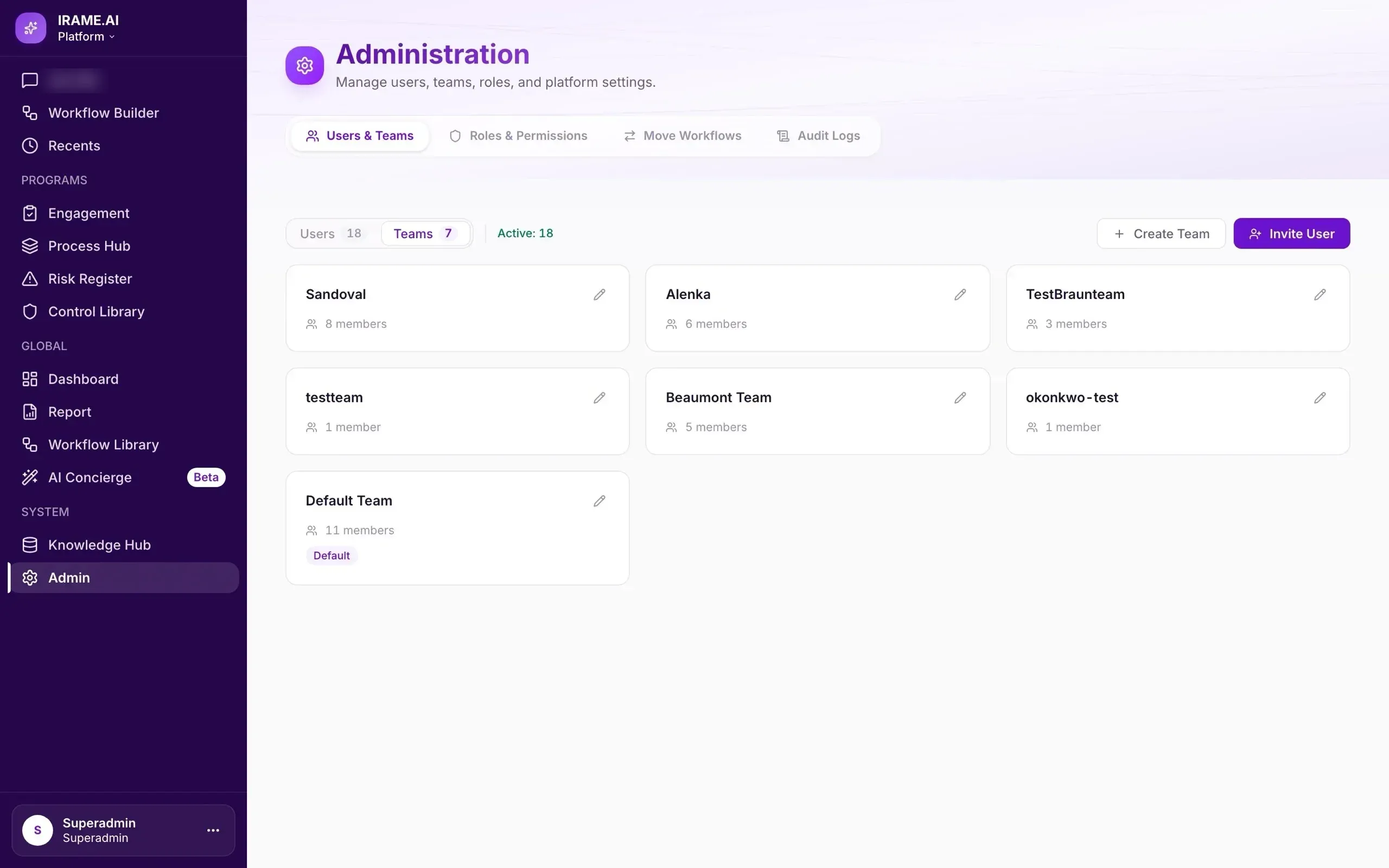
Step 01 of 5 · Users and Teams, Teams toggle
Switch to teams,
which sits behind a toggle in the same view as people rather than in a place of its own. Seven teams live here, named by whoever created them.
FromUsers and Teams
Teams toggle
7 teamsnamed freely
Teams toggle, named freelySwitch to Teams
Step 02 of 5 · Create Team
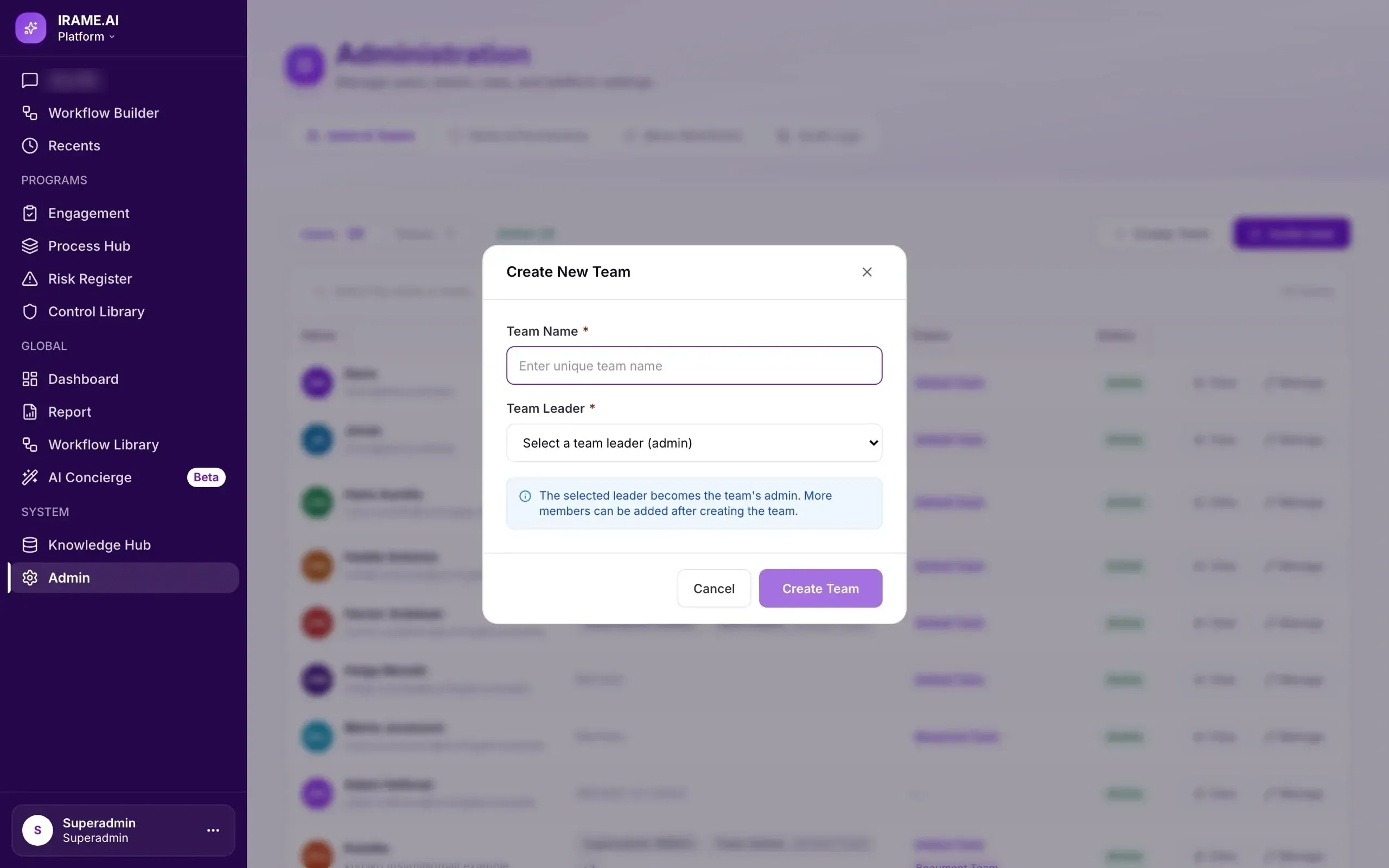
Create the team.
A name, and a leader chosen now from people who already exist, required so a team can’t quietly exist unaccountable.
FromTeams
Create Team
Name
Leaderrequired, becomes team admin
Leader required, no exceptionsCreate Team dialog
Step 03 of 5 · Edit team
Open the team
by clicking its card, or the pencil on it. Both lead to the same place.
FromTeams
Team card
Click the cardopens Edit team
Pencil iconopens Edit team
Card or pencil, same placeOpen a team card
Step 04 of 5 · Edit Team, Add Members
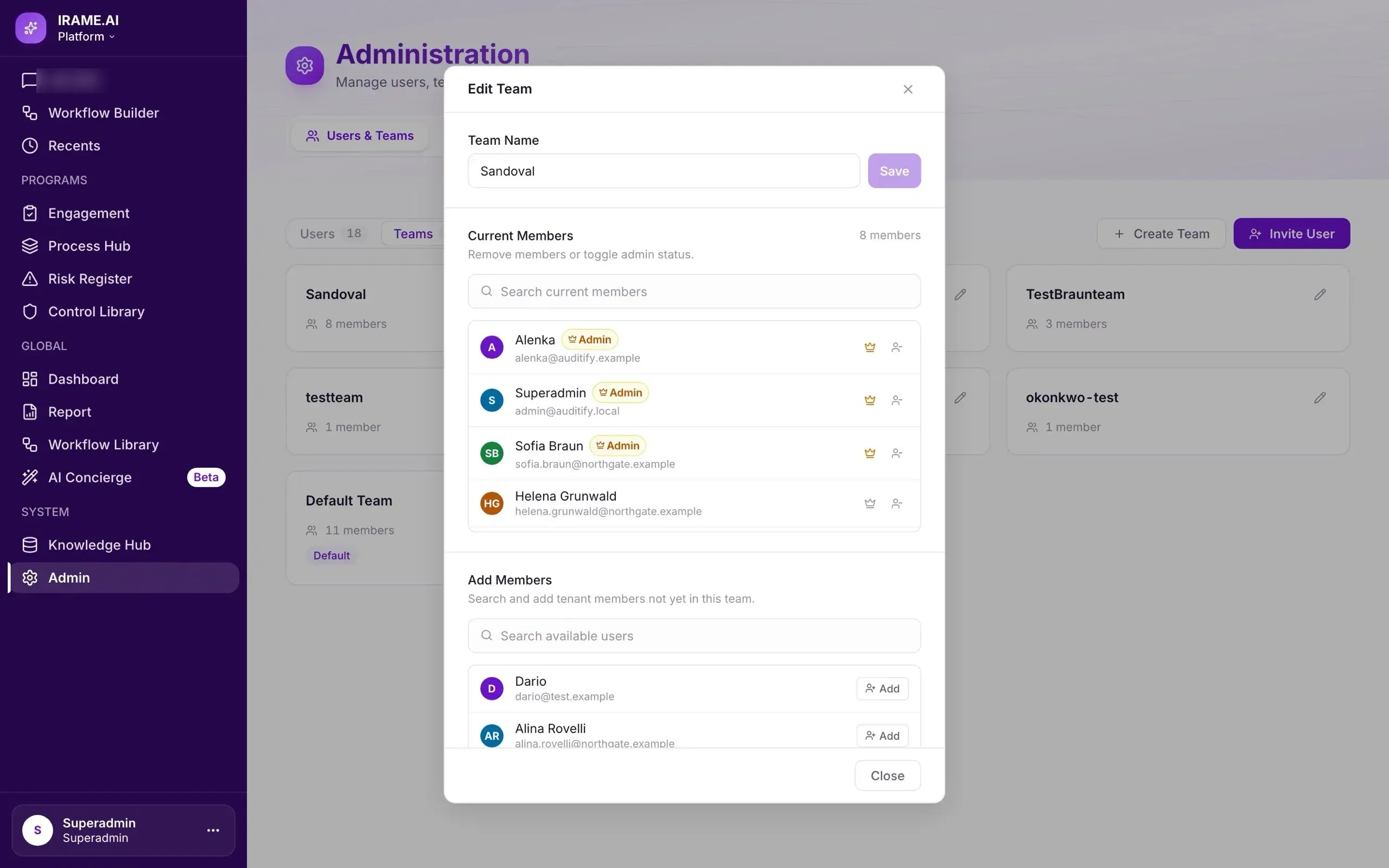
Add people
from a list of everyone in the organisation who is not in this team yet.
FromEdit Team
Add Members
Everyone not in it yetfrom the whole organisation
Not already in the teamAdd Members search
Step 05 of 5 · Edit Team, Current Members
Grant team admin
with a crown, or remove somebody, using two icons that carry no visible text.
FromEdit Team
Current Members
!Crown, no textgrants team admin
!Remove, no texttakes access away
Crown = admin, no labelCrown grants, icon removes
Where it breaks, and the fix
The two most consequential controls in the module are same-size icons on a hover row, told apart only by a small difference in shape.
They do have tooltips, but a tooltip appears one control at a time after a pause. It can’t help you tell two things apart at a glance, and on this row that’s the moment that matters.
The team editor is reachable only from the teams view. Nothing in the people list links a person to their team.
Fix: visible labels on both controls, and a link from each person to their team.
Flow four · Answering the question
What can this person actually do
The flow the module was commissioned for.
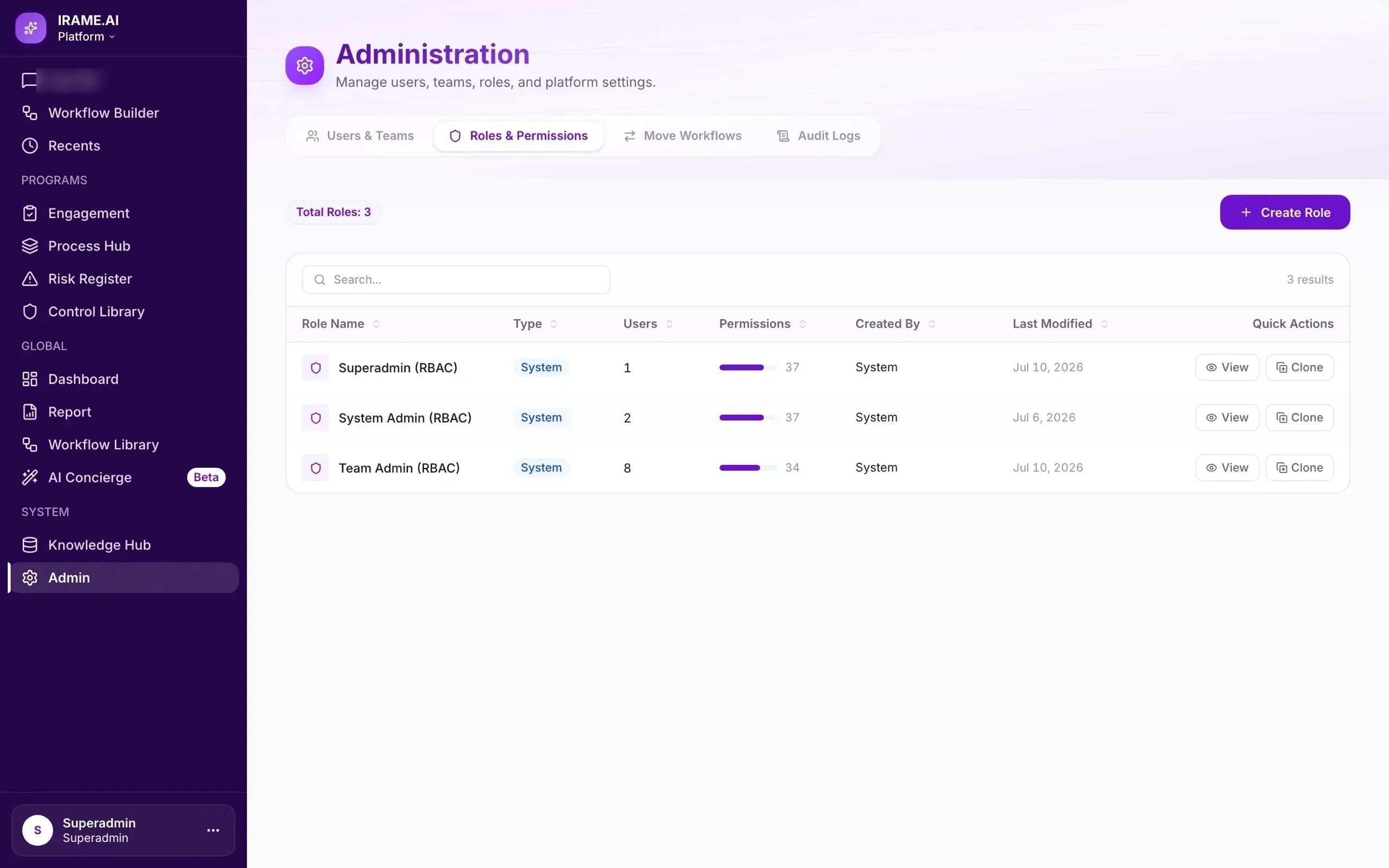
Step 01 of 4 · Admin, Roles and Permissions
Open the roles list.
Three roles, who holds each one, and when it last changed.
FromAdmin
Roles and Permissions
3 roles
Who holds each
Last changed
Who holds it, last changedThree roles, who holds each
Step 02 of 4 · View
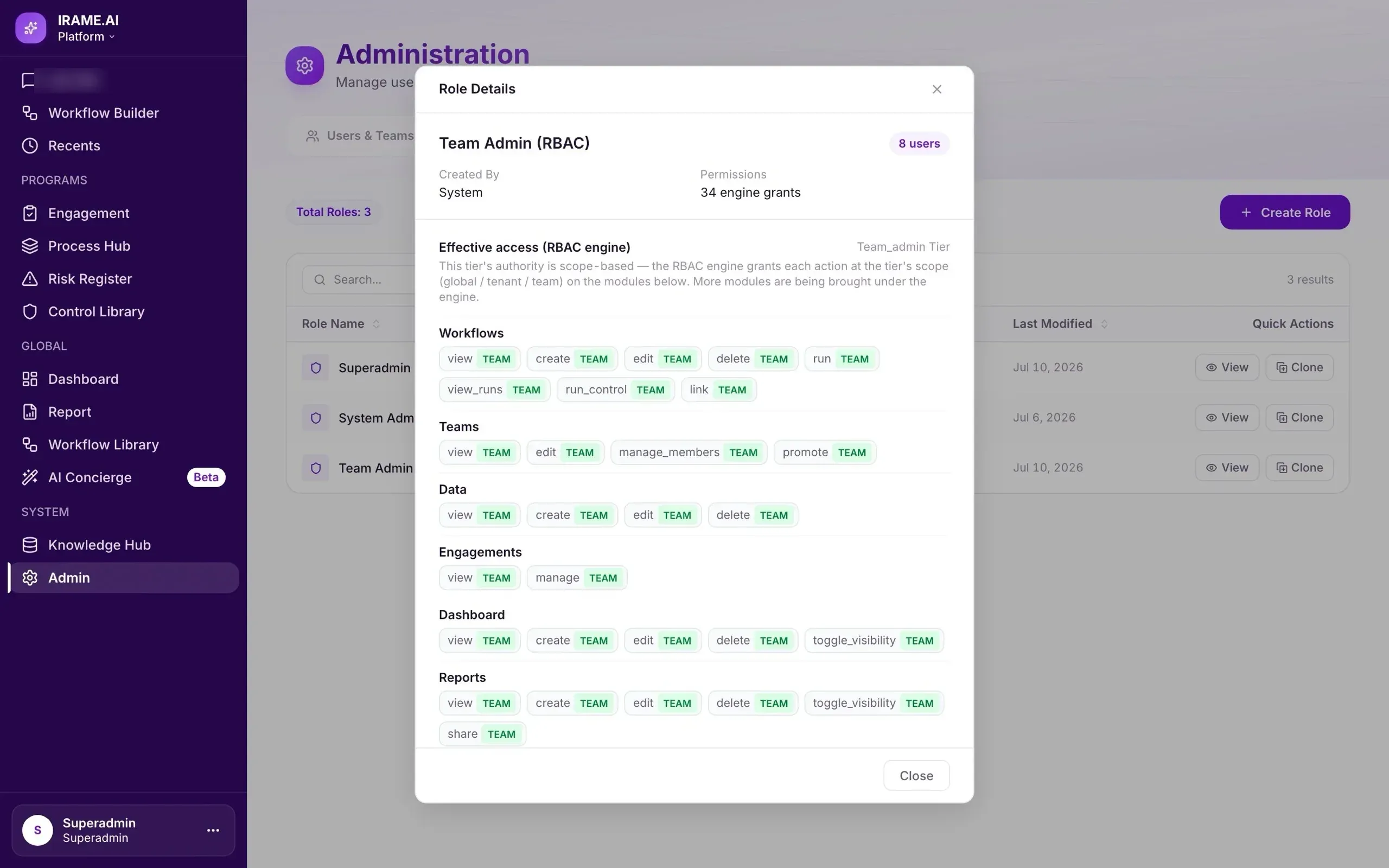
Open a role.
The panel states the tier in plain words, then lists every power with its reach beside it. Each marked part is explained under the screen.
FromRoles list
View
Tierin plain words
Every powerwith its reach
Power countHow many powers this tier holds. The organisation tier shows the same number, which is the point.
Plain-words summaryThe panel says in plain words what kind of authority this is, before listing anything.
Teams groupTeams is the group that separates the tiers. A team lead keeps this and loses the three that reshape the organisation.
The platform tier. Every power appears with its reach, so an administrator reads the tier instead of trusting its name.
1→Power count. How many powers this tier holds. The organisation tier shows the same number, which is the point.
2→Plain-words summary. The panel says in plain words what kind of authority this is, before listing anything.
3→Teams group. Teams is the group that separates the tiers. A team lead keeps this and loses the three that reshape the organisation.
Step 03 of 4 · View, on a second role
Compare against another tier.
Same groups, same order. Every line that appears differs by one word, and three lines are simply not there.
FromPlatform tier
Team tier
Same groups & order
Reach reads one team
Three lines absent
TEAM scope replaces GLOBALCompare the team tier
Step 04 of 4 · Create Role
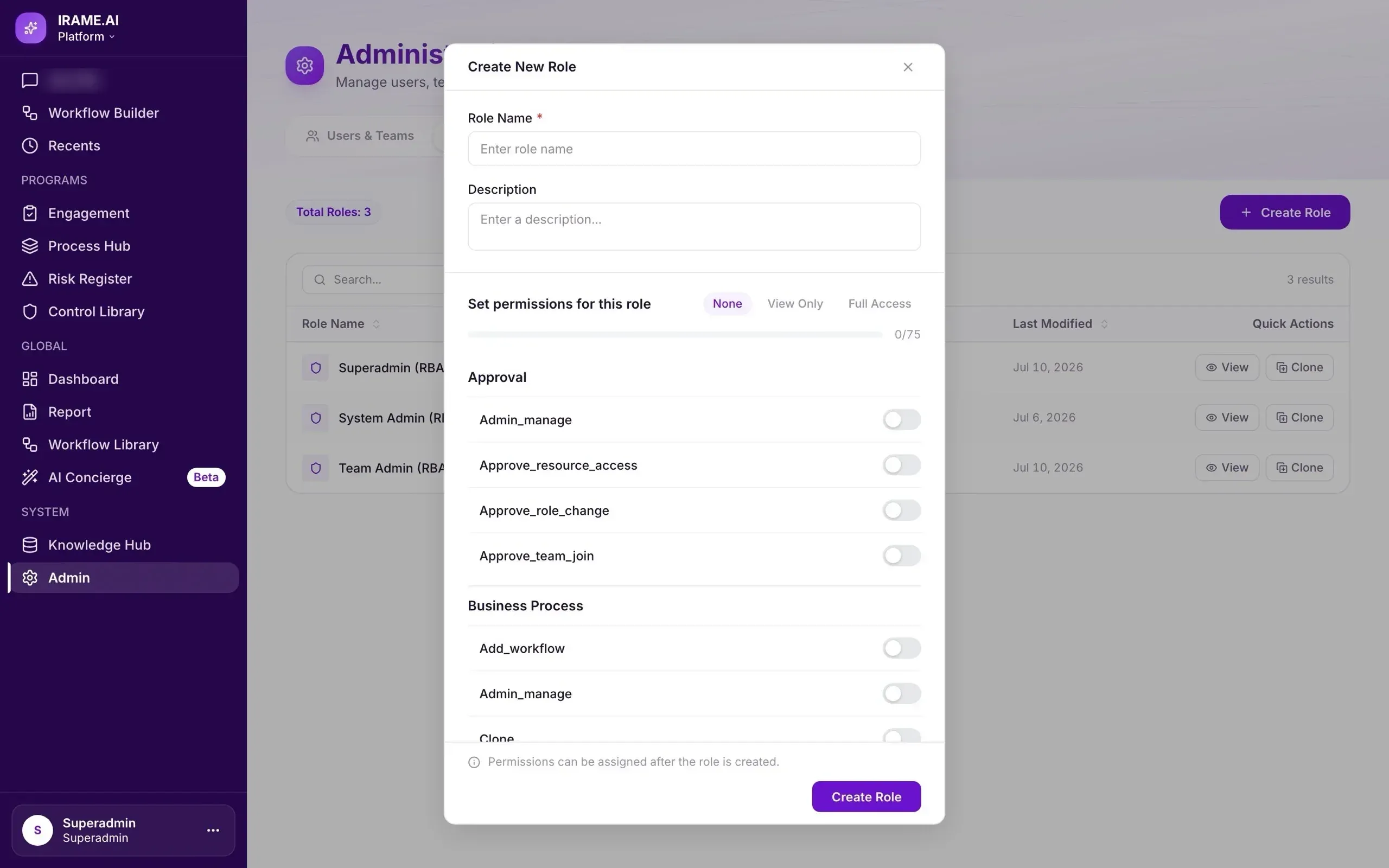
Build a new role,
if none of the three fit, from a matrix of seventy-five permissions.
FromRoles list
Create Role
75 permissions11 resources, with presets
!26 the engine ignoresreads only 49
Full matrix, built from scratchBuild from the matrix
Where it breaks, and the fix
Steps one to three work. Step four is the one I’d take back: it hands you the old 75-permission catalogue, of which the engine reads 49.
You can tick “manage users” or “manage roles” and nothing will act on either.
That screen looks as authoritative as the tier panel two clicks away, so an administrator can’t tell which one the engine obeys.
Fix: tell the screen which model the workspace is on. The flag already exists, so a workspace on the old model stops being shown permissions the engine ignores.
Flow five · Proving it afterwards
Showing a reviewer how somebody got their access
The flow that decides whether an auditor can use any of this as evidence.
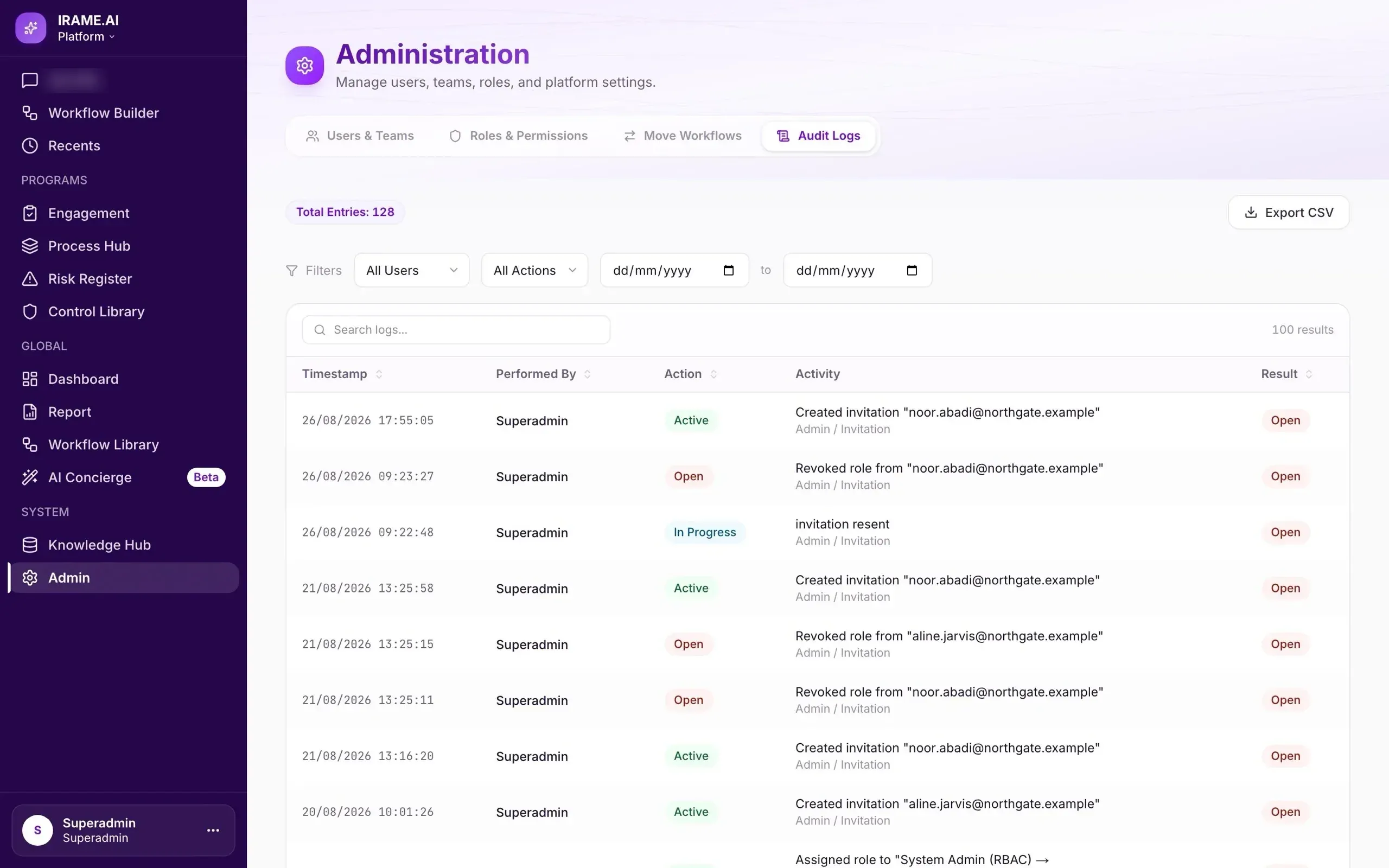
Step 01 of 3 · Admin, Audit Logs
Open the trail.
Access changes, newest first, with who performed each one and when.
FromAdmin
Audit Logs
Access changesnewest first
Who did it
When
Who, and whenOpen the trail
Step 02 of 3 · filters above the table
Narrow it
by person, by kind of action, or by date range.
FromAudit Logs
Filters
Person
!Kind of actionCreate shows as Active
Date range
Filter by person, action, or dateNarrow by user or action
Step 03 of 3 · Export CSV
Export,
because evidence has to be able to leave the system that produced it.
FromAudit trail
Export CSV
Leaves the systemas a CSV file
Has to leave the systemExport CSV
Where it breaks, and the fix
The server records 21 distinct event types in the last hundred entries alone. The Activity column keeps that detail as a readable sentence. That part works.
The Action column doesn’t: events collapse into create, update or delete, then render through a status component built for workflow states, so create shows as Active.
The filter genuinely works, it filters on the real verbs, but looks broken. Pick Create and every row says Active, so administrators stop using it.
Fix: show the event the server already sends in the Action column, and let the filter use the same words.
Underneath the model: the permission engine, details and edge-case states3 sections · about 5 min
Underneath
What the model actually is, once you open it
The part a screenshot cannot show, and the part that decides whether any of the above is true.
The role records are markers
A role doesn’t carry its own permissions. It carries a tier, and the engine resolves that tier into grants at request time.
Platform and organisation roles resolve to an identical set of actions; the team role is that same set minus three. None of it is stored on the role itself.
Right call, but invisible: the roles list shows three rows that look editable. Two of them aren’t, in any way that matters, and nothing on screen says so.
Two vocabularies, and four things that fall between them
The old catalogue speaks in names like datasource:create. The engine speaks in seven modules, names like data.create, each carrying a scope. Even where they agree on the concept, they disagree on the word.
Catalogue: 11 resources. Engine: 7 modules. Seven of the eleven line up, some under a different name. Four line up with nothing: approvals, roles, sessions, users.
That’s 26 of the 75 permissions an administrator can tick that the engine has never heard of, and they govern who can invite a person, suspend one, create a role, or assign it.
business_process7→business_process
workflow9→workflows
team8→teams
report7→reports
dashboard6→dashboard
engagement7→engagements
datasource5→data
approval4→nothing
role9→nothing
session6→nothing
user7→nothing
26 of the 75 permissions an administrator can tick map to nothing the engine reads, flagged rows govern inviting, suspending, creating and assigning.
The engine is switched on one workspace at a time
Each workspace carries a flag for whether the engine applies to it. Customer workspaces have it on.
Our own internal workspace, the one used to build and demo, is still on the old model, so the version the team looks at every day is the one the engine isn’t running.
The flag does reach the front end and is shown in our internal setup tool. Nothing in the module it should govern ever reads it.
On a workspace with the engine switched off, the role panel still renders headed with the engine’s name, describing tiers and reaches in confident detail. The screen has no idea which world it is in.
The word “role” means four different things
A person has four things called “role”: a platform superadmin flag, an organisation membership role (really a job title), the access role (resolves to a tier), and a per-team admin flag.
None of these contradict each other; they answer different questions. My own account is a platform superadmin and an auditor in the same payload, and both are true.
Problem: nothing on any screen tells them apart. Same word, four meanings, the interface picks whichever is nearest.
Teams are not the only structure
Alongside teams there is a reporting hierarchy, a separate thing with its own membership events. It answers who reports to whom rather than who works on what, and it matters for approvals. The access module does not surface it anywhere.
Organisation
Team
Team
Team
Team
+ 3 more, named by whoever created them
Reporting hierarchywho reports to whom · not in the module
Two levels of team membership, nothing deeper. The reporting hierarchy is dashed because it's real, has its own membership events, and is nowhere in the module.
A team lead can promote but not demote, on purpose
The team tier can promote but not demote. Reads like an oversight; it’s the decision in the model I’m most confident about.
Promotion adds a second pair of eyes, more scrutiny. Demotion removes scrutiny, and in an audit department that shouldn’t happen quietly inside the team it affects.
So demotion sits one level up: the administrator’s call, landing in the trail with an outside actor.
I can’t prove the rule held from this workspace’s history: the two demotions logged in three months happened under the old model here, so they aren’t evidence of the tier holding.
The trail cannot answer the question it exists for
Every event logs the actor, the target, and the time, plus a field for the state before the change. Across the last hundred entries, that field is filled in once.
Auditors don’t ask what happened, they ask what it was before. The trail proves somebody assigned a role. It can’t show what that person could do the day before.
Detail
The small calls
None of these makes a portfolio screenshot on its own. Together they are most of the design.
Team admin is a toggle rather than a role. Somebody can lead two teams and administer neither at organisation level, and the shape of the control makes that obvious.
Expired invitations stay visible. Hiding them would tidy the list and also erase the fact that two people never got in.
Cloning comes before creating. Starting from a role that already works beats an empty matrix for a job most administrators do once a year.
Somebody with no team gets a label rather than a blank cell, because an empty cell reads as a bug.
Checking and changing are separate buttons, since looking is far more common than editing.
The team leader is required when a team is created, so a team cannot exist with nobody accountable for it.
“Add members” lists only people not already in the team, so the common mistake is never offered.
States
The states nobody screenshots
In an access screen these are not edge cases. They are the product.
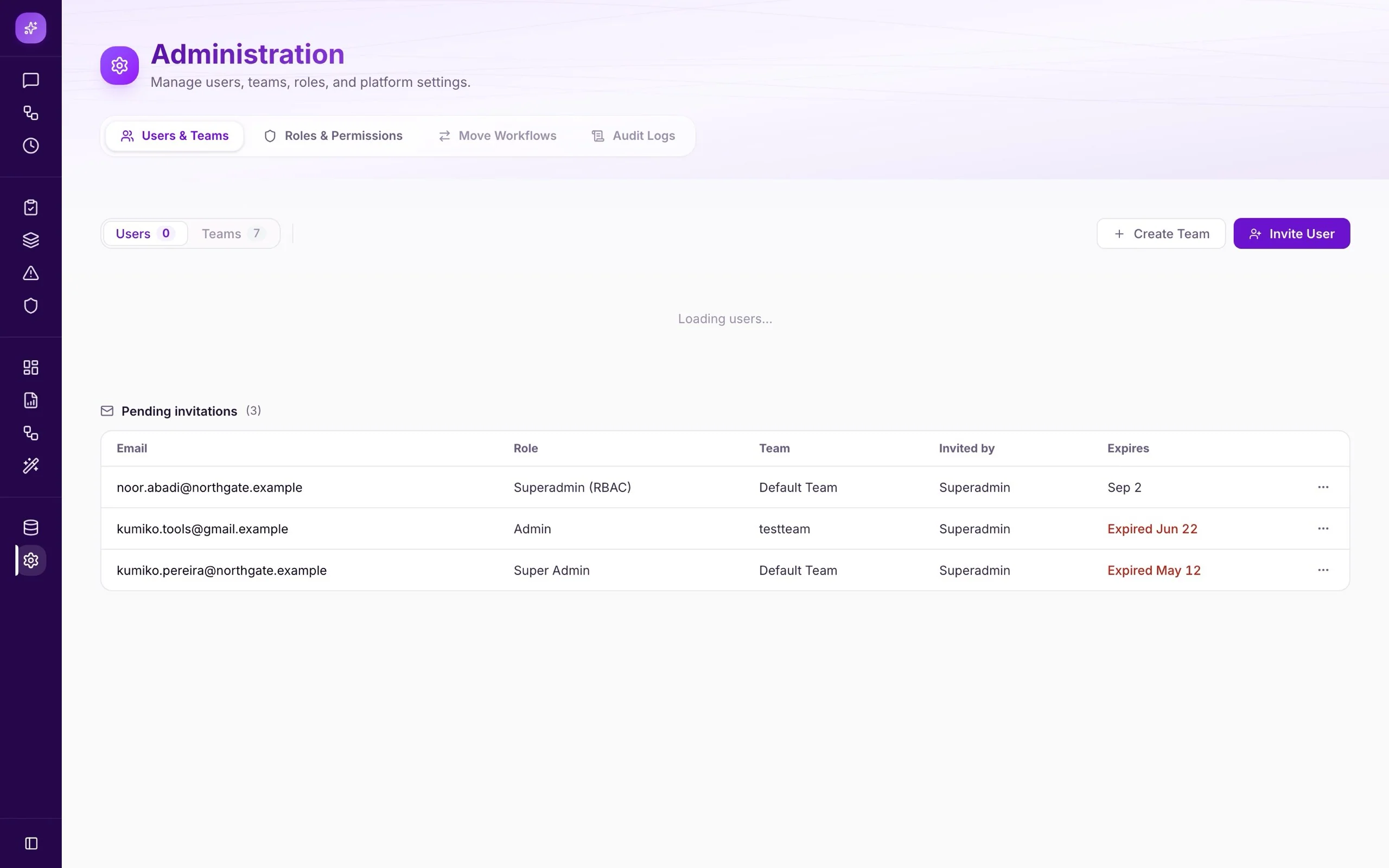
Users 0The count reads zero before the list has answered, so for a moment the page says nobody is here.
Loading users…One grey line is the only sign the request is still in flight.
Loading. The count reads zero while the request is still in flight.
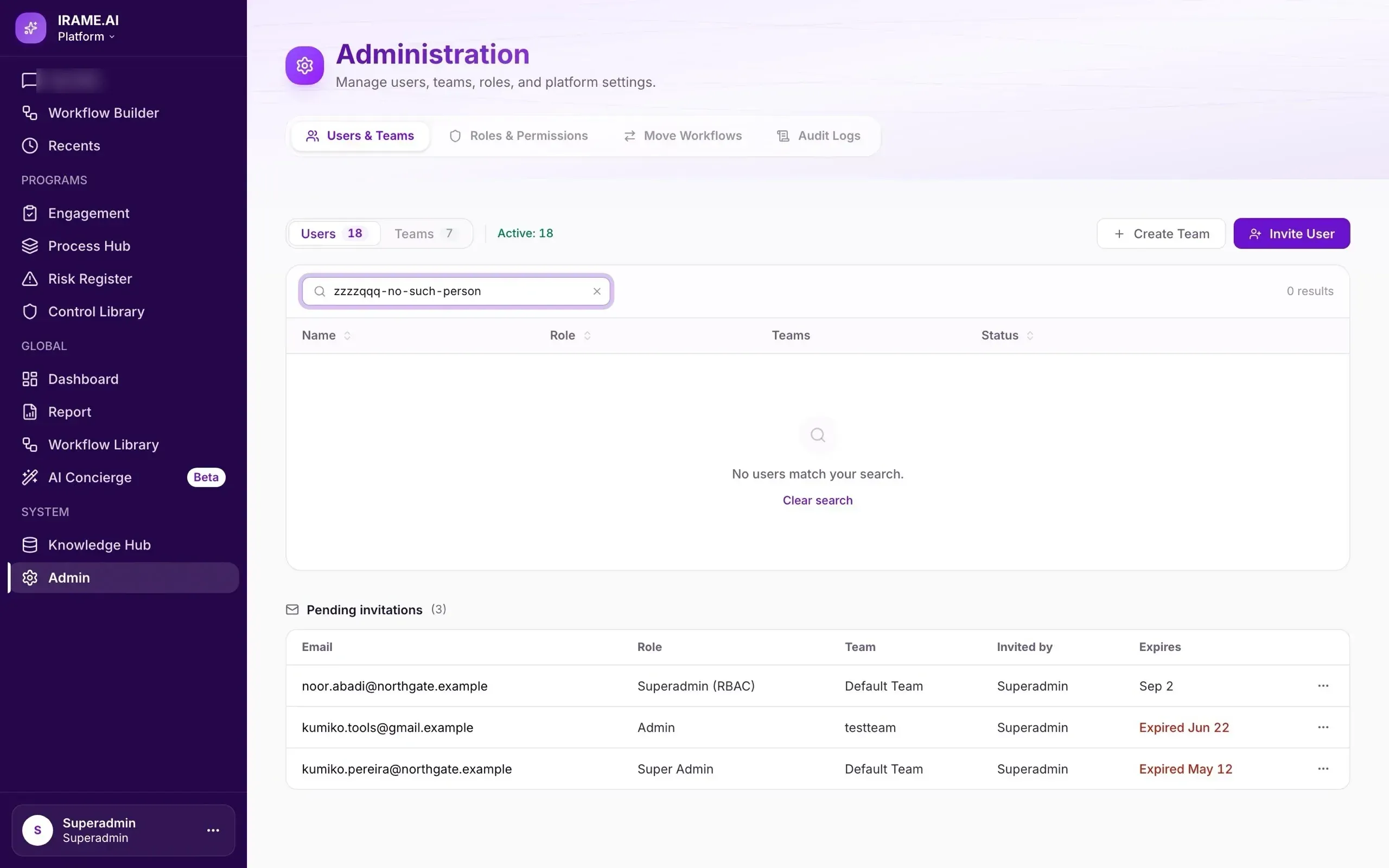
Users 18The total stays at 18, so an empty result can’t be read as an empty organisation.
0 resultsThe count is about the search, not the people.
Clear searchThe message names the search, and the way out sits right under it.
A genuine empty result, with a way back out of it.
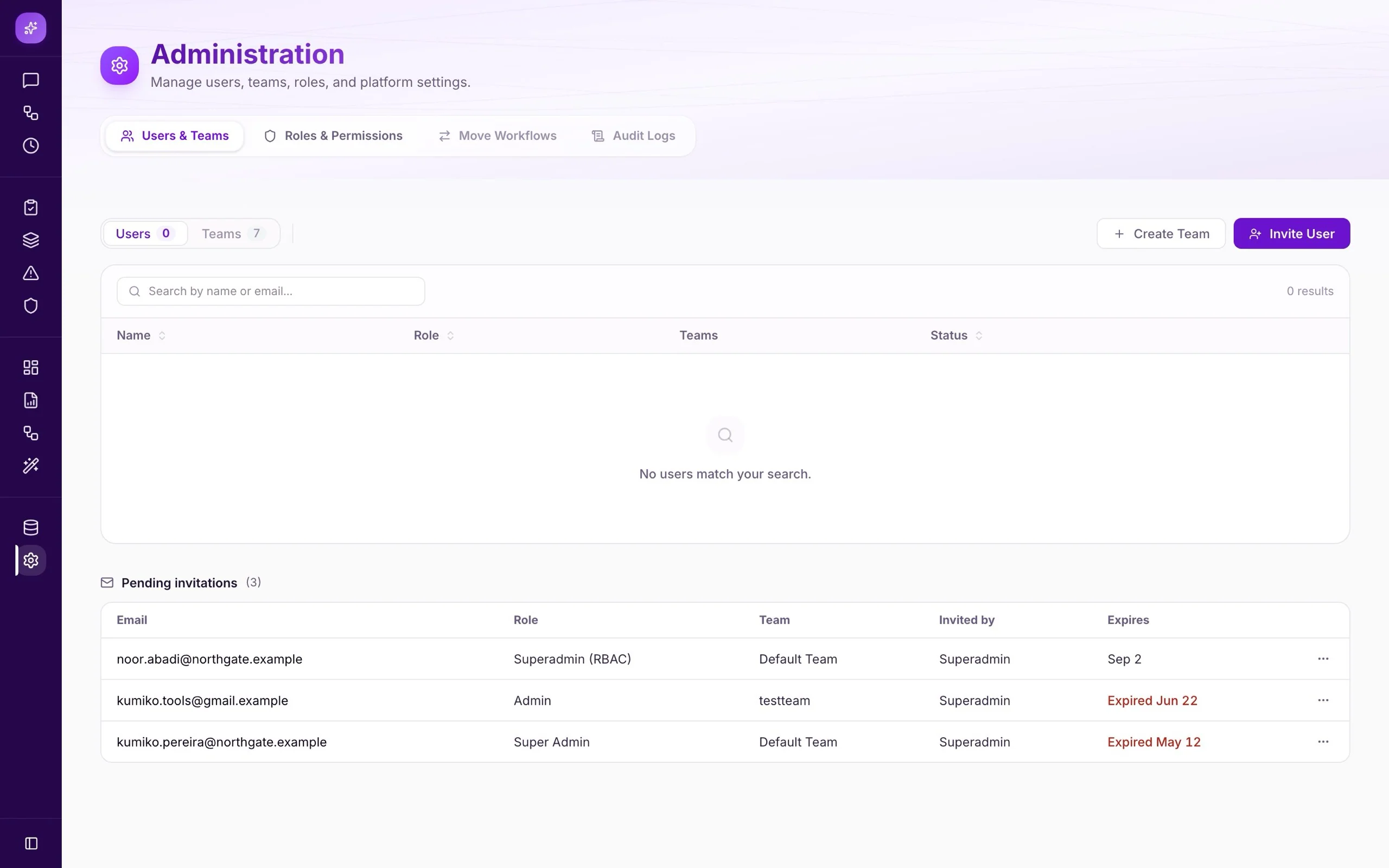
Users 0The request failed, and the count still reads zero people.
Empty search boxNobody searched. The box is still showing its placeholder.
The wrong messageIt blames a search that never ran. Nothing on the screen says the request failed.
A failed request. Read the callout below before trusting what this screen says.
What each state shows 8
Users 0The count reads zero before the list has answered, so for a moment the page says nobody is here.
Loading users…One grey line is the only sign the request is still in flight.
Users 18The total stays at 18, so an empty result can’t be read as an empty organisation.
0 resultsThe count is about the search, not the people.
Clear searchThe message names the search, and the way out sits right under it.
Users 0The request failed, and the count still reads zero people.
Empty search boxNobody searched. The box is still showing its placeholder.
The wrong messageIt blames a search that never ran. Nothing on the screen says the request failed.
Where it breaks, and the fix
When the people-list request fails, the screen doesn’t say so. It shows zero people, an empty result, and a message about a search nobody ran.
On most screens that’s a bad state. On an access control screen it’s a safety problem: a broken page looks identical to an organisation with nobody in it.
I designed the loading state and the empty state, and the error state in between is the next one to design: a failed load has to say so, never pass as an empty organisation.
Next to design
What somebody sees when they open a surface they do not have rights to. In an access module it matters as much as the role panel, which is why it is on my list of next steps below.
Outcome
Shipped, and role setup fell from 20 minutes to under 2
The module is in production, and it is the answer the team now gives when a customer asks how access works.
Setting up a role with the right permissions used to take an administrator about 20 minutes. With the ordered tiers it takes under 2. Adoption and support-ticket tracking come next, along with these:
What I would measure first
1. How many invitations expire without being accepted. This is the failure I can already see and cannot size.
2. Time from invitation sent to first successful sign-in, which tells you whether flow one works at all.
3. How often somebody opens a role panel within a minute of opening a manage panel, which would turn flow two’s gap into a number.
4. Role changes reversed within a week. A reversal usually means the first change was made without understanding it.
5. Failed loads on these screens, currently invisible for the reason described above.
What I would do next, in order9 steps · the first two finish unfinished design
Put the tier summary inside the manage panel, beside the choice. This one change would do the most, because it closes the gap in the flow the module exists for.
Tell the screen which world it is in. The flag is already there and unread, so a workspace on the old model should stop being shown a panel describing the engine.
Give the trail back the words the server already sends. Drop the status badge from the action column, show the event, and let the filter offer the same words the column displays.
Record the state before a change and show it, so the trail can answer what an access change altered rather than only that it happened.
Separate the four things called “role”, starting with the two that appear on the same screen. This is a naming problem and it is mine.
Give the icons visible labels rather than tooltips. The crown that grants team authority and the control that removes a person are the two most consequential controls in the module, so they should read at a glance.
Chase expiring invitations, with a reminder before they lapse and a prompt on the admin screen after.
Design the screens for somebody without rights, properly, instead of leaving them to whatever the components do by default.
Give failure a face, so an unavailable server never looks like an organisation with nobody in it.
Learnings
What I would tell myself at the start
Reach is ordered. Permission lists are not.
The model was the easy part once I stopped trying to make roles differ from each other. An ordered thing can be explained to a client in one sentence. I got there slowly, because I started where everyone starts: with a matrix.
A good model does not carry itself through the flows
The tier panel is the best screen I made here, and it sits one tab away from the only moment anybody needs it. Most delegation decisions still get made by reading a role name. Building the explanation was not the same as putting it where the decision happens.
Review what the product says about itself, not just its screens
An engine switched off while the screen describes it in confident detail. One word carrying four meanings. A trail with an empty before-state. A status component pressed into service as an action column. None of that shows up in a screenshot or a design review. It shows up when you read what the product says about itself.
Screening Nilesh?Answers come from my resume and case studies
The 10-second version
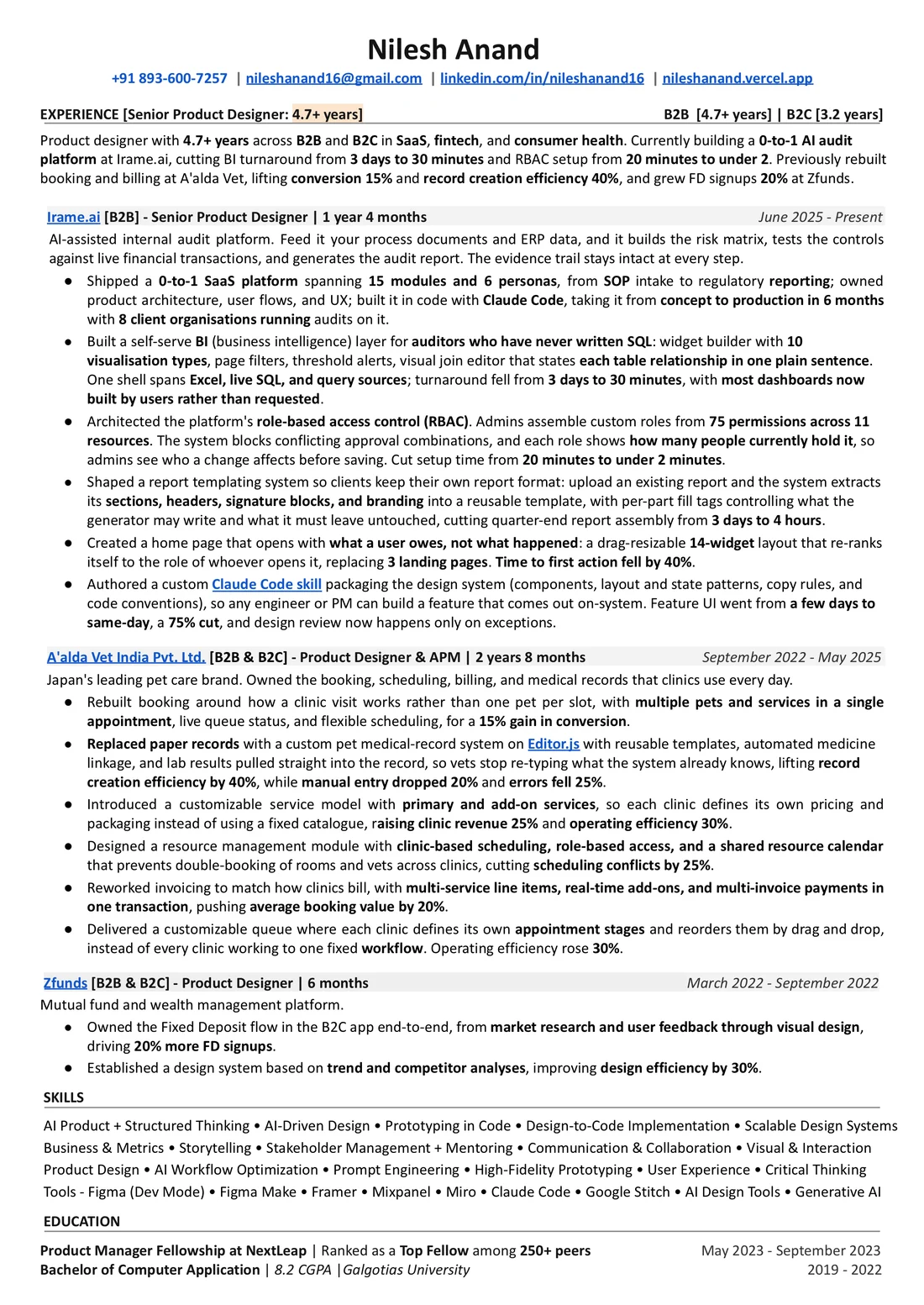
Senior Product Designer, 4.7+ years in B2B SaaS and B2C, focused on AI products for experts. Took an AI audit platform from concept to production in 6 months, and builds what he designs in code.